
Data Engineering System Design: Clickstream Data Into a Modern Lakehouse
A complete end-to-end architecture for building scalable clickstream analytics and real-time user understanding using a Lakehouse, streaming ingestion, and ML-ready data models.

Clickstream data powers some of the most important decisions in modern digital products — including funnel analysis, marketing optimization, A/B testing, personalization, recommendation engines, and user-behavior modeling.
But the challenges are real:
Data volume spikes
Out-of-order events
Evolving schemas
Multi-team consumers
Near real-time freshness requirements
In this article, we’ll design a production-grade near real-time clickstream pipeline using a Lakehouse architecture (Delta/Iceberg/Hudi), streaming ingestion, and BI + ML data models.
This walkthrough uses 7-Step Data Engineering System Design Framework, the same one used in FAANG-level interviews and real-world data platform designs.
High-Level Architecture Diagram
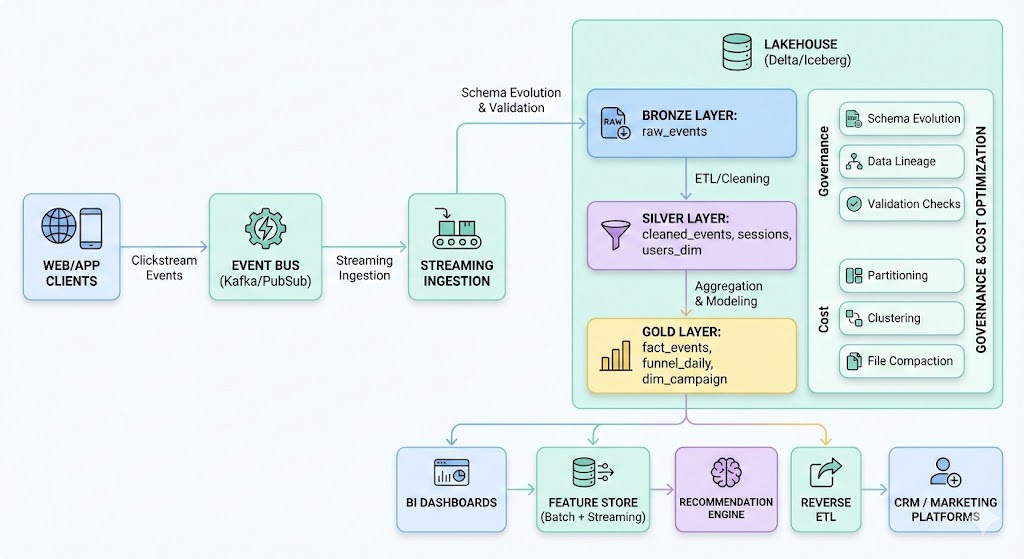
7-Step Data Engineering System Design Framework
1. Start With the User — Requirements Drive System Design
Strong system design starts with who will use the data and why.
Users & Their Requirements
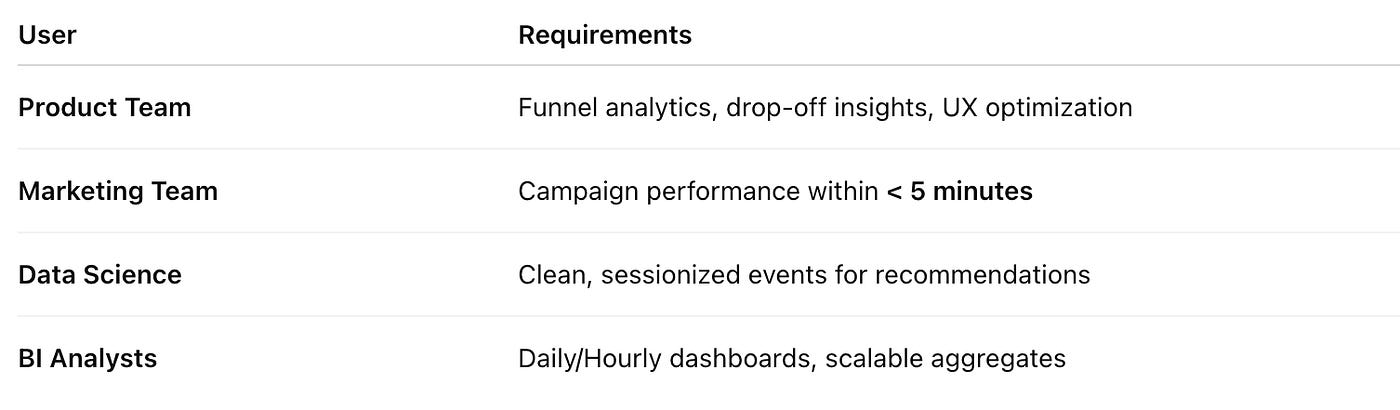
Key requirements identified:
Near real-time freshness (1–5 minutes)
High throughput ingestion (50K–200K events/sec)
Historical replay capability
ML-friendly data models
Reverse ETL support for personalization and CRM updates
This step prevents us from over-engineering (e.g., requiring millisecond latency when not needed).
2. Understand the Sources & Constraints
Source: Web + Mobile clients → Event Collector → Kafka
Challenges:
Out-of-order events
Duplicated events
Schema evolution
Huge traffic spikes (product launches, Black Friday)
Dropped events due to flaky clients
Technical constraints:
Event schema arrives as JSON
Some events include nested properties
Latency targets differ by consumer type
ML needs session-level and user-level derived features
Understanding these constraints early avoids brittle design choices later.
3. Batch vs Streaming — And Why Micro-Batch Wins
We choose Micro-Batch Streaming (1–5 min intervals) using Spark Structured Streaming / Flink / ksqlDB.
Why Streaming?
Marketing + product teams want data within minutes
Data Science teams need near real-time features
BI still wants daily aggregation but on clean tables
Why Micro-Batch instead of Pure Streaming?
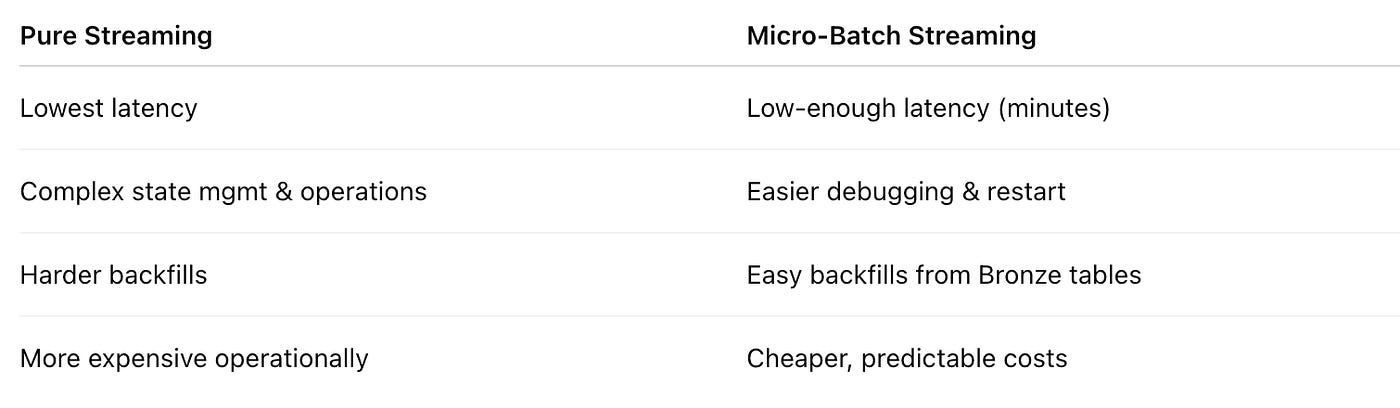
Trade-off decision:
We optimize for freshness + operational simplicity, not ultra-low latency.
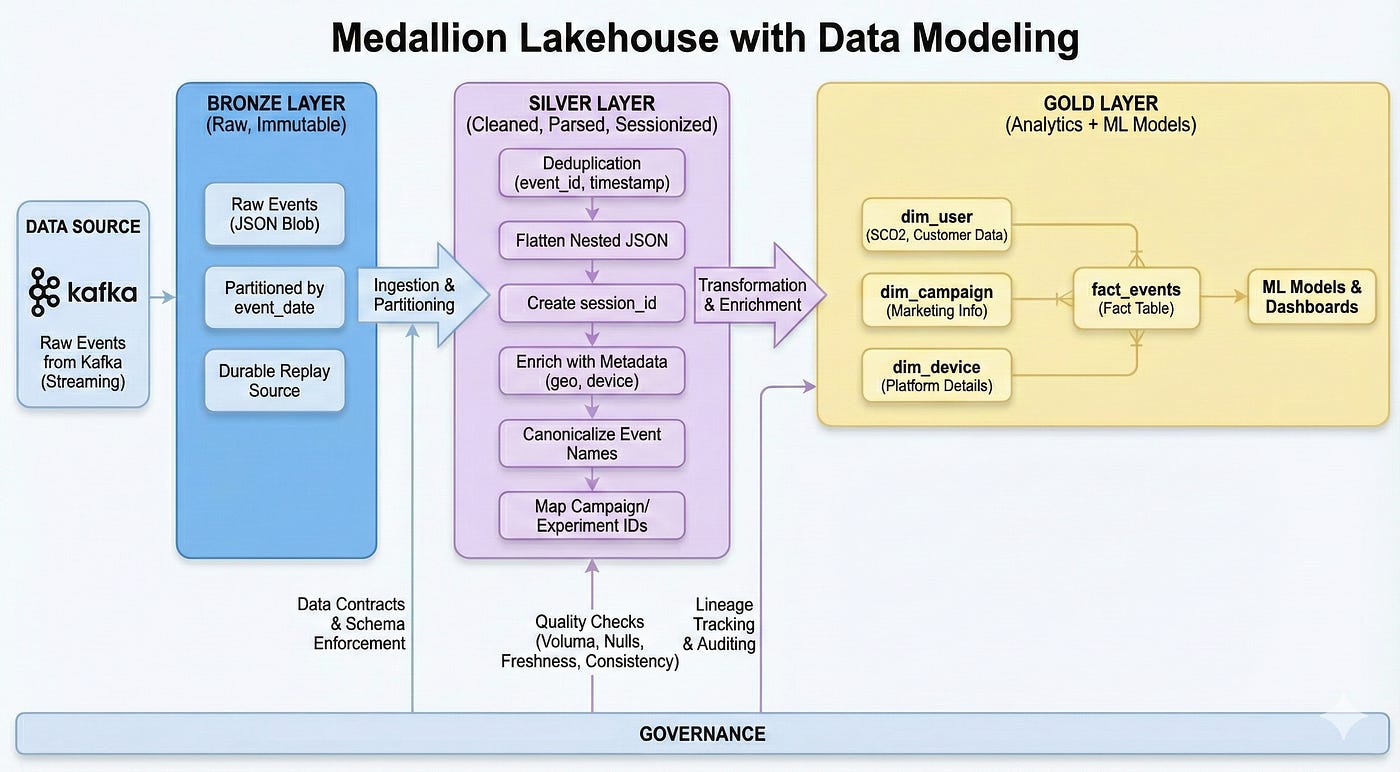
4. Storage Layout — Lakehouse Medallion Architecture
The Lakehouse solves three core problems:
Schema evolution
ACID guarantees
Streaming + batch unification
We apply the classic Bronze → Silver → Gold pattern.
Bronze Layer — Raw Events (Immutable)
Exactly as received from Kafka
Partitioned by event_date
Stores full JSON blob
Durable replay source
Why:
Bronze is your source of truth for past and future backfills.
Silver Layer — Cleaned, Parsed, Sessionized
Transformations:
Deduplication using (event_id, timestamp)
Flattening nested JSON
Creating session_id
Enriching with geo/device/platform metadata
Canonicalizing event names
Mapping campaign_id, experiment_id
Why:
Silver creates trust — the single clean dataset for ML and analytics.
Gold Layer — Analytics + ML Models
Gold tables include:
Fact Tables
fact_events
fact_session_daily
fact_funnel_daily
Dimensions
dim_user (SCD2)
dim_campaign
dim_device
Features for ML
Rolling 7-day engagement
Recency/frequency metrics
“Propensity-to-purchase” input features
5. Data Modeling — Designing For Analytics + ML
Let’s model fact_events:
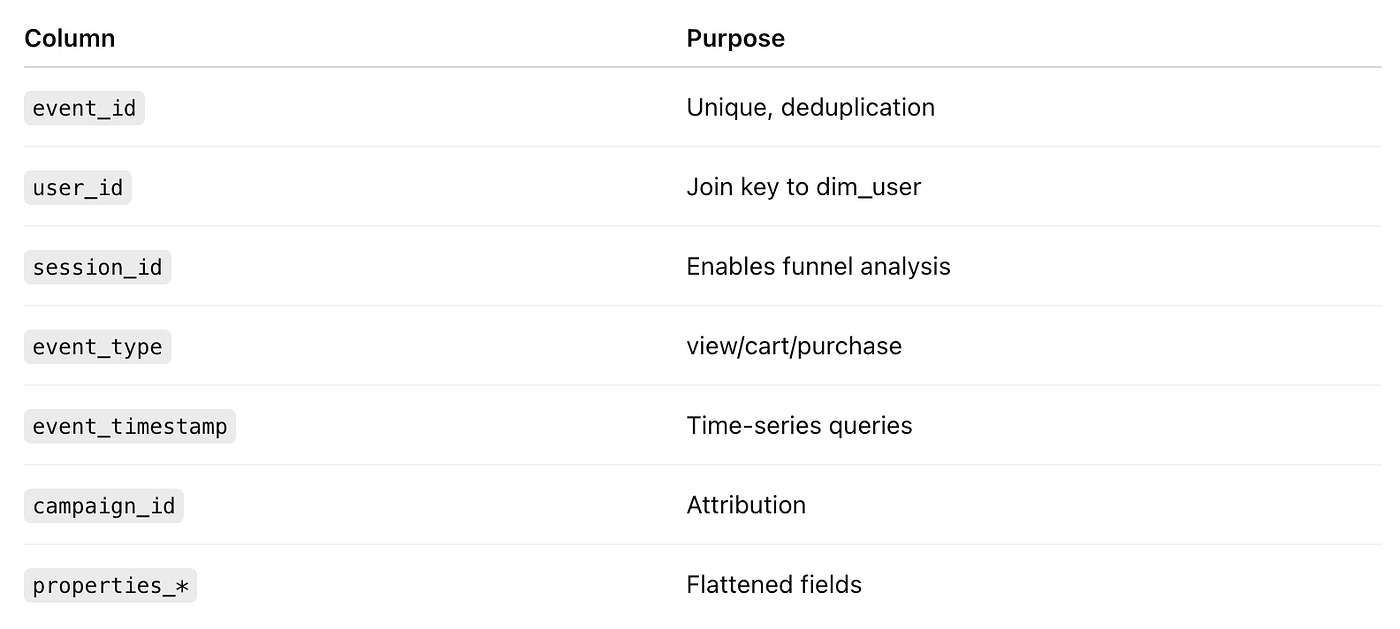
Dimensions use SCD2 to maintain historical correctness.
Why:
Fact/dimension modeling is still the backbone of trustable metrics and ML feature derivation.
6. Governance, Quality, Lineage, Observability
Tools like Monte Carlo, dbt tests, Great Expectations ensure:
Quality Checks
Volume anomalies
Null spikes in key dimensions
Freshness SLA breaches
Revenue/event consistency
Lineage
Event → Bronze → Silver → Gold → Dashboard
Essential for debugging and compliance
Data Contracts
Producers must send:
event_type
event_timestamp
user_id
Required per-event schema fields
Contracts reduce fire-drills by catching breaking changes upfront.
7. Failures, Backfills, and Operational Concerns
Failures we design for:
Kafka consumer lag
Schema drift
Upstream bad deploys
Duplicate events
High-cardinality partition explosions
Backfills:
Replay from Bronze (source of truth)
Incremental rebuild of Silver/Gold
Parameterized run-by-date pipelines
Cost Optimization:
Partition by date
Cluster by user_id/session_id
Compact small files
Autoscale compute
Query pruning
Reverse ETL Output:
High-intent users → CRM (Braze, HubSpot)
Audience segments → Ads platforms
Personalized product recommendations
Q&A Playbook
1. Scalability & Performance
Q1. “What happens if your clickstream volume increases 10x?”
Answer :
“I’ve designed the pipeline so that each layer can scale independently:
Ingestion (Kafka / Pub/Sub):
We use topic partitioning by something like user_id % N or region so we can scale out consumers horizontally.
If volume grows 10x, we increase partitions and consumer group size. Each consumer handles a smaller subset of events, so throughput scales linearly up to a point.
Streaming compute (Spark Structured Streaming / Flink):
Our streaming jobs are stateless or use bounded state where possible. That lets us scale them horizontally as well.
We use auto-scaling for the streaming cluster based on lag and CPU utilization to handle volume spikes.
Storage (Lakehouse + Warehouse):
In the lakehouse, storage is cheap and elastic. The main concern is query performance, so we partition by event_date and cluster by high-cardinality keys like user_id or session_id to keep queries efficient as volume grows.
On the warehouse side (Snowflake/BigQuery), we rely on auto-scaling warehouses/slots and prune partitions aggressively using date + filters.
We also separate ‘hot’ and ‘cold’ workloads:
Recent data (last 7–30 days) is optimized for heavy query workloads.
Older data moves to cheaper storage with less frequent access.
So the design scales primarily by horizontal fan-out (more partitions, more consumers, more compute nodes) and smart layout (partitioning/clustering) rather than pushing a single node harder.”
Q2. “How does this handle peak load during something like Black Friday?”
Answer :
“Black Friday is effectively a stress test for the entire clickstream stack, so we plan for it explicitly:
Capacity Planning & Auto-Scaling
We look at historical spikes and capacity-test at 2–3x expected peak.
Kafka and streaming clusters have auto-scaling based on lag and CPU metrics. If lag increases beyond a threshold, we scale out consumers.
Backpressure & Graceful Degradation
The event collector has backpressure: if downstream is temporarily slow, it buffers and sheds non-critical events first (e.g., debug/diagnostic events) while keeping core events (view/cart/purchase) high priority.
Streaming jobs are designed with at-least-once semantics and idempotent writes, so temporary lag is acceptable as long as we catch up.
Optimized Storage Layout
On peak days, we’re very reliant on partitioning and compaction.
We compact small files into larger ones (e.g., 256–512MB) to minimize metadata overhead when scanning peak-day partitions.
Pre-warmed Compute
For the warehouse, we pre-warm heavier compute tiers or additional warehouses in anticipation of Black Friday dashboards and ad-hoc queries.
So the system may run at higher latency temporarily, but it won’t fall over, and we’re designed to catch up quickly once the burst passes.”
Q3. “If queries on your clickstream tables start slowing down over time, what knobs do you have to tune?”
Answer :
“I’d diagnose and tune in this order:
Query Patterns
Are downstream users filtering on event_date, region, event_type? If not, I’d work with them to add WHERE clauses and avoid full scans.
Partitioning & Clustering
Ensure partitions are on event_date and not too granular (no per-minute partitions).
Add clustering/Z-ordering on common filters like user_id, session_id, campaign_id.
Small File Problem
If we’re generating too many small Parquet files from streaming, we run scheduled compaction jobs.
Materialized Views / Aggregates
For common heavy queries, we create aggregated tables (e.g., fact_funnel_daily) instead of re-scanning raw clickstream.
Compute & Concurrency
Scale up or out compute, and potentially separate heavy BI workloads from experimentation/DS workloads.
So we mix data layout optimizations with compute scaling.”
2. Reliability & Failure Scenarios
Q4. “What if your event collector / tracking endpoint goes down?”
Answer :
“End-to-end reliability starts at the edge:
Client-side buffering:
SDKs batch events and retry with exponential backoff on transient failures.
If the collector is down briefly, events are retried and not dropped immediately.
Multi-region setup:
For critical products, we put the event gateway behind a global load balancer with regional failover.
If one region fails, traffic fails over to another.
Graceful degradation:
We keep the event collection asynchronous so product UX isn’t blocked by analytics failures.
Worst case, we lose some events but the product still works.
We also have alerts on event ingestion volume. If we see a sudden drop across all sources, that’s a red flag for collector/Kafka issues, and on-call is paged to investigate.”
Q5. “What happens if your streaming job falls behind and Kafka lag grows?”
Answer :
“That’s a classic scenario. We deal with it via:
Monitoring Lag
We track Kafka consumer group lag and set SLOs (e.g., lag < 5 minutes).
Auto-scaling & Tuning
If lag grows, we auto-scale streaming executors and optimize job settings (batch interval, parallelism, state store tuning).
Backpressure & Alerting
Streaming frameworks have backpressure mechanisms; we tune them to avoid crashing but also not silently falling hours behind.
If lag exceeds a critical threshold, we page on-call and update a status page for stakeholders.
Replay from Bronze
Even if we temporarily lag or we need to redeploy with a fix, we can always reprocess from Bronze raw events, because they are immutable and fully stored.
So the system is elastic and replayable rather than brittle.”
Q6. “How do you handle bad or malformed events? Do they crash the pipeline?”
Answer :
“We never want a single bad event to crash the whole job:
Schema & validation at Silver stage:
We parse events with robust error handling and send malformed events to a ‘quarantine’ table or DLQ instead of failing the entire micro-batch.
Severity-based policy:
If error rate is low, we proceed and alert.
If error rate exceeds a threshold, we can automatically fail the pipeline to prevent poisoning downstream data.
Feedback loop:
The DLQ is monitored, and we use those records to harden the schema, add validation, or update upstream producers.
This keeps the pipeline resilient but also gives us good observability into data issues.”
3. Security, PII & Compliance
Q7. “How do you handle PII in clickstream events?”
Answer :
“We assume PII will inevitably sneak into events, so we design for containment and control:
Segregated Zones
We separate PII zones from general analytics data. Certain fields (email, phone, address) are either removed, tokenized, or stored in a restricted dataset.
Tokenization / Hashing
For linking purposes (e.g., joining web behavior to customer records), we hash identifiers like email using a salted hash.
Only a small service has access to the salt if we need reversibility (or we avoid reversibility for privacy).
Field-Level Policies
Event contracts explicitly forbid sending raw PII in certain fields; any violation is flagged.
Encryption
Data at rest is encrypted; PII tables can have stricter key policies.
Data in transit is always TLS-protected.
That way, general analysts work off de-identified clickstream, while PII is tightly controlled.”
Q8. “How do you enforce different access for Finance vs Product teams?”
Answer :
“We use a combination of RBAC + column-level & row-level security:
Role-Based Access
Finance, Product, Marketing, and DS have separate roles/groups.
Each role is granted only the schemas/tables they need.
Column-Level Security
Sensitive columns like emails, IPs, or internal identifiers are masked or hidden for certain roles.
Finance may see revenue/cost fields that Product doesn’t need.
Row-Level Filters
For multi-tenant systems or region-based restrictions, we add row filters based on tenant/region fields and user attributes.
Auditing
All access to PII tables is logged.
We periodically review logs with Security/Compliance.
This makes access principle-of-least-privilege while still enabling teams to be productive.”
Q9. “How would you answer a GDPR/CCPA-style ‘right to be forgotten’ request for a user?”
Answer :
“For ‘right to be forgotten’, we need to:
Identify all user data across clickstream, customer, and derived tables using keys like user_id or hashed identifiers.
Implement deletion or anonymization:
Either delete rows for that user (if allowed)
Or scrub PII and retain only aggregated, non-identifiable metrics.
For the clickstream lakehouse:
Bronze: we may delete or fully anonymize the user’s events.
Silver/Gold: we rebuild or apply targeted deletes/updates for that user, ensuring downstream aggregates don’t expose identity.
We also log the erasure operation to prove compliance.”
4. Operations, CI/CD, and “Is Data Safe to Use?”
Q10. “How do you deploy changes to this clickstream pipeline?”
Answer :
“We treat the data platform as software:
CI/CD for ETL and dbt
All transformation code is in Git.
On PRs we run unit tests, schema checks, and dbt tests.
Environment Promotion
Changes are tested in dev/stage with sampled or synthetic data.
Only after validation and stakeholder sign-off do we promote to prod.
Blue/Green / Dual-Writing
For high-risk changes, we run the old and new pipelines in parallel, compare metrics, and then cut over once they match.
This reduces the risk of breaking production metrics when evolving the pipeline.”
Q11. “Who’s on-call when this breaks, and what do they have?”
Answer :
“There’s a rotating Data Platform on-call who owns the pipelines and infrastructure. They have:
Dashboards:
Pipeline success/failure
Kafka lag
Freshness of key Gold tables
Row counts vs baseline
Alerting:
PagerDuty /alerts for freshness, failures, anomalies.
Runbooks:
Clear step-by-step instructions for common incidents (lag, connector failure, schema drift, bad deploy).
Escalation Paths:
If the issue is upstream (event collector, app), we know which SRE/app teams to page.
So we don’t just have code; we have a structured operational model.”
Q12. “How do business teams know when data is safe to use for today?”
Answer :
“We provide a ‘data readiness’ signal:
For key datasets (e.g., fact_events, funnel_daily), we publish:
‘Last successful refresh time’
‘Status: READY / LATE / FAILED’
This is shown through:
A simple status page for data sets
Or a ‘data freshness’ indicator in BI tools
We also:
Fail downstream dashboards or show a banner if data is stale beyond SLA.
Use SLAs like ‘BI dashboards are guaranteed fresh by 8 AM local time’.
This builds trust so stakeholders aren’t guessing.”
5. Trade-Offs & Alternative Designs
Q13. “Why did you choose Kafka instead of writing events directly to the database or warehouse?”
Answer :
“Kakfa gives us durability, decoupling, and scalability:
Decoupling
Producers only worry about pushing events to Kafka; multiple consumers can independently process the same stream (analytics, monitoring, ML, auditing).
Replayability
If a downstream job fails or we change logic, we can re-consume from Kafka from a chosen offset.
Backpressure Handling
Kafka is built for high throughput and can buffer bursts, which a database or direct warehouse writes would struggle with.
Direct DB/Warehouse writes tightly couple producers and storage, offering no buffer, no replay, and poor scalability for high event volumes.”
Q14. “Why a Lakehouse instead of just a warehouse with staging tables?”
Answer :
“The lakehouse adds a few crucial properties:
Cheap, elastic storage for raw events at massive scale.
ACID + schema evolution on files (Delta/Iceberg/Hudi).
Time travel and versioning, which help with backfills and audits.
Unification of streaming & batch on the same data.
You can do some of this directly on a warehouse, but:
Storing raw, very high-volume clickstream in the warehouse can be expensive.
Warehouse staging areas are less flexible for long-term raw retention and replay.
So the lakehouse is ideal for raw & intermediate layers, while the warehouse excels at serving modeled analytics over Gold tables. Many orgs blend both.”
Q15. “Why micro-batch instead of fully real-time streaming?”
Answer :
“Micro-batch hits the sweet spot for this use case:
Latency vs Complexity
The business requirement is ‘within a few minutes’, not milliseconds.
Micro-batch (1–5 min intervals) satisfies that with much lower operational overhead than true event-at-a-time streaming.
Backfills & Reprocess
Micro-batch jobs are easier to reason about and re-run for specific windows.
Full streaming often requires more complex state management and checkpointing.
Cost
Micro-batch can be cheaper; it processes data in efficient chunks.
If we had hard real-time requirements (e.g., in-app personalization with sub-second feedback), I’d reconsider continuous streaming + low-latency stores. But for near-real-time analytics and feature generation, micro-batch is a pragmatic choice.”
Q16. “What would make you reconsider this design?”
Answer :
“I’d reconsider parts of the design if:
We needed sub-second personalization in the request path → we might add a dedicated real-time store like Pinot/Druid/Redis.
We had multi-region active-active requirements → might replicate Kafka and lakehouse across regions with conflict resolution.
Storage/compute cost explodes → we might introduce more aggressive aggregation, data retention policies, and tiered storage.
The framework stays the same, but the exact tools and trade-offs shift as requirements change.”
Conclusion
When you zoom out, clickstream data is the heartbeat of a digital company. Every scroll, click, tap, view, and purchase tells a micro-story about your users and your product.
A well-designed clickstream pipeline transforms those micro-stories into actionable intelligence — powering funnels, cohorts, recommendations, experiments, revenue insights, and ML features.
But getting there requires discipline: understand the users, design around constraints, model the data intentionally, anticipate failures, and build for evolution — not just ingestion.
If you follow a structured system design framework, you don’t just build a pipeline.
You build a platform for learning, experimentation, personalization, and growth.
That’s what modern data engineering is all about.